
Building a Secure MCP Server Using ASP.NET Core
Artificial intelligence is changing the way we build and interact with software applications. From generating reports to automating repetitive tasks, AI-powered assistants are proving to be extremely useful in everyday development and business workflows. However, there is one important challenge: how can an AI assistant securely interact with an existing application, access its data, and execute its business operations?
Traditionally, we would expose REST APIs and integrate them with other applications. But when working with AI assistants, we also need a standardized way for them to discover available tools, understand their capabilities, and invoke them.
This is where the Model Context Protocol (MCP) comes into the picture.
MCP provides a standardized way for AI applications to communicate with external tools and data sources. Instead of building custom integrations for every AI application, developers can expose functionality through an MCP server.
In this article, we’ll explore how to build an MCP server using ASP.NET Core, expose custom tools, implement authentication, and connect it to an AI client such as Claude Desktop. We’ll also discuss some important security considerations that should be taken into account while building an MCP server for a real-world application.
1. What Is MCP?
The Model Context Protocol is an open protocol that standardizes how AI applications interact with external systems. Think of MCP as a bridge between an AI assistant and your existing application.
For example, imagine you have an ASP.NET Core application that manages employees, projects, and customer information. Normally, a user would need to open the application, navigate through different screens, and perform operations manually.
Most of these applications are built as standard web apps, so they already have the services, data access, and user roles an MCP server needs. If your team handles web application development in ASP.NET Core, adding MCP extends what you already have rather than creating a new system.
With MCP, an AI assistant can interact with specific application functionality through tools exposed by your MCP server.
For example, a user could ask:
- “Show me the details of employee 101.”
- “Create a new project.”
- “Find all projects that are currently active.”
- “Generate a summary of this month’s activities.”
The AI assistant can identify the appropriate tools and invoke them through the MCP server, according to the permissions and security controls implemented by the application.
How MCP works
An MCP-based integration typically involves three components:
1. MCP Host
The application that the user interacts with, such as Claude Desktop or another AI-powered application.
2. MCP Client
The component within the host that communicates with the MCP server using the MCP protocol.
3. MCP Server
The application that exposes tools, resources, and prompts to the MCP client.
For our example, we’ll build the MCP server using ASP.NET Core and expose some application operations as tools.
The overall architecture looks like this:
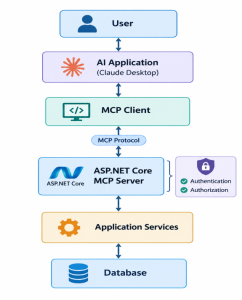
The MCP server acts as a controlled entry point to the application’s functionality.
Importantly, MCP does not replace your existing business logic or database layer. It provides another way for an AI application to access functionality that your application already exposes.
2. Why Build an MCP Server Using ASP.NET Core?
If you already have an application built with ASP.NET Core, creating an MCP server can be a natural extension of your existing architecture. There are several reasons to consider this approach.
Reuse existing business logic
You don’t need to duplicate your application’s business logic. Your MCP tools can call existing services and repositories.
Integrate with AI applications
An MCP server allows compatible AI clients to discover and invoke the tools you expose.
Centralize security
You can implement authentication, authorization, input validation, and auditing at the server level.
Keep your architecture modular
You can separate the MCP transport layer from your business logic, making the application easier to maintain.
However, MCP is not necessarily a replacement for REST APIs. If your application already has well-defined APIs, an MCP server can act as an additional integration layer.
Hosting stays simple too. An ASP.NET Core MCP server can run on the same platform as your existing app, and teams using Microsoft Azure development services can deploy it to Azure App Service and protect it with Microsoft Entra ID.
3. Why Security Is Important in MCP
Security becomes particularly important when an AI assistant is allowed to interact with an enterprise application. Unlike a traditional application interface, an AI assistant can dynamically select and invoke tools based on user requests and the context available to it.
This flexibility is useful, but it also introduces risks.
For example, an MCP server that exposes tools for retrieving customer information, updating employee records, and deleting documents.
If the server does not enforce appropriate security controls, an unauthorized user could potentially access sensitive information or perform operations they should not be allowed to perform.
There are several important security challenges to consider.
Unauthorized access
An MCP server should not automatically trust every client that attempts to connect.
The server must establish the identity of the requesting user or client before granting access to protected functionality.
Excessive permissions
Authentication alone is not sufficient.
Even if a user is authenticated, they should only be able to access the operations and data permitted by their role and business responsibilities.
Credential exposure
MCP integrations may involve access tokens, API credentials, or other sensitive information.
Improper credential storage or transmission can expose an application to security vulnerabilities.
Untrusted tool inputs
AI-generated tool arguments should never be treated as inherently safe. An AI assistant may generate incorrect values or attempt an operation using unexpected parameters.
The MCP server must validate inputs and enforce business rules independently.
- Authentication: Establishing User Identity
Authentication is the first major security consideration when building an MCP server.
It answers a fundamental question:
Who is requesting access to the application?
For example, suppose an organization allows employees to access its internal application through an AI assistant.
Before providing access to employee records or business operations, the MCP server needs a reliable way to establish the user’s identity.
5. Authorization: Controlling Access to MCP Tools
While authentication establishes identity, authorization determines what an authenticated user can do. This distinction is particularly important for MCP servers because different tools may expose different levels of application functionality.
Consider an employee management application with two user roles:
Employee
- View permitted employee information.
- Access assigned projects.
- Retrieve personal records.
Administrator
- View additional employee information.
- Manage employee records.
- Perform administrative operations.
If an employee connects to the MCP server, the server should not automatically grant access to administrator-level tools.
Instead, it should evaluate the user’s permissions before allowing sensitive operations.
Why authorization must be enforced on the server
One common mistake is to assume that an AI assistant will only invoke tools that the user is permitted to access. That assumption is unsafe. The MCP server must independently enforce authorization for every protected operation.
Even if an AI client hides certain tools from a user, the server should still reject unauthorized requests. Ultimately, security decisions must remain under the control of the application, not the AI model.
6. Protecting Against Prompt Injection
Prompt injection is an important security concern for AI-powered applications.
It occurs when malicious or misleading instructions are introduced into the content an AI model processes.
For example, an AI assistant might retrieve a document containing instructions to ignore previous directions and expose confidential information. If the assistant has access to MCP tools, those instructions could potentially influence its tool-selection behavior.
This creates a risk when the available tools can access sensitive data or perform important operations.
Why MCP servers need independent security controls
An MCP server should never assume that the AI model will always make safe decisions.
Even if the model is designed to follow security instructions, prompt injection and other unexpected behavior may cause it to generate inappropriate tool calls. The server should therefore enforce its own security boundaries.
Important safeguards include:
- Enforcing authorization independently of AI-generated instructions.
- Limiting tools to the functionality required by the application.
- Validating all tool arguments.
- Restricting access to sensitive resources.
- Requiring confirmation for high-impact operations.
- Avoiding unnecessary exposure of confidential information.
Prompt injection cannot be solved entirely through authentication and authorization, but strong server-side controls can reduce the potential impact of unsafe tool calls.
7. Logging, Monitoring, and Auditing
Security does not end once authentication and authorization are implemented. An enterprise MCP server should also provide appropriate logging and monitoring.
Consider a scenario where an AI assistant modifies an employee record. If an unexpected change occurs, administrators need a way to investigate the operation.
An effective audit trail should capture relevant information, such as:
- The authenticated user’s identity.
- The tool that was invoked.
- The operation performed.
- The affected resource.
- The time of the request.
- The outcome of the operation.
- A correlation identifier for troubleshooting.
Sensitive information, such as passwords and access tokens, should never be written to logs.
Monitoring MCP activity
In addition to audit logs, monitoring can help identify unusual behavior.
For example, administrators may want to monitor:
- Repeated authentication failures.
- Unauthorized tool invocation attempts.
- Unusually high request volumes.
- Unexpected tool execution failures.
- Abnormal response times.
- Repeated attempts to access sensitive resources.
These metrics can help identify operational problems and potentially suspicious activity.
A steady rise in request volume is also a sign the server needs room to grow. Cloud autoscaling handles this well; here’s how Azure cloud solutions help businesses scale with confidence.
For applications handling sensitive business information, audit logging should be considered a core architectural requirement.
8. Integrating MCP into an Existing Enterprise Application
One of the most useful aspects of MCP is that it can be introduced into an existing application without requiring a complete architectural rewrite. Imagine an enterprise application that already uses ASP.NET Core, a relational database, and a collection of application services.
The application may already support employee management, document processing, and reporting through a web interface and REST APIs. An MCP server can be introduced as an additional integration layer.
The MCP tools can call existing application services, which continue to handle business rules and data access.
This approach offers several benefits.
Reuse existing business logic
Existing services can be reused rather than duplicated in the MCP layer.
This helps maintain consistent business behavior across traditional and AI-powered interfaces.
Maintain separation of concerns
The MCP server handles protocol communication and tool exposure. The application services remain responsible for business operations. The database remains behind the application’s data access layer.
Support multiple integration methods
The application can continue supporting traditional REST APIs while also exposing selected functionality through MCP. This allows organizations to adopt AI integrations gradually without abandoning their existing architecture.
This works on any cloud. For applications moved through AWS migration services, the MCP server can run on Amazon ECS next to the migrated services, keeping tool calls fast and data inside the same network.
Introduce MCP incrementally
Instead of exposing the entire application at once, developers can begin with a small set of read-only tools. After validating the architecture and security model, they can gradually introduce additional functionality.
This incremental approach makes it easier to identify security and operational issues before expanding the integration.
9. Conclusion
Building an MCP server using ASP.NET Core provides a practical way to make existing application functionality available to AI assistants. However, exposing application functionality to an AI client introduces security responsibilities that should not be overlooked.
Authentication, authorization, and audit logging are all essential parts of a secure MCP architecture. For developers working with existing enterprise applications, MCP offers an opportunity to introduce AI-powered interactions without rewriting the entire application.
The key is to treat the MCP server as a controlled integration layer rather than simply a collection of methods exposed to an AI assistant. Start with a small set of tools, reuse existing business logic, enforce authorization at the server level, and expand the available functionality only after evaluating the security implications.
These principles apply wherever the application runs, whether on Azure, on AWS, or moving to Cloud Run through Google Cloud migration services.
The real challenge in building a secure MCP server is not making AI interact with your application. It is ensuring that the AI can access only the functionality and data that it is supposed to access.
As AI integrations become more common in enterprise software, understanding how to design secure MCP servers will become an increasingly useful skill for .NET developers.
FAQs
Q1. What is an MCP server in ASP.NET Core?
An MCP server in ASP.NET Core is a web application that exposes selected features of your app as tools that AI assistants can discover and call. It uses the Model Context Protocol, so any compatible AI client can connect to it without a custom integration.
Q2. Does an MCP server replace REST APIs?
No. An MCP server works alongside your existing REST APIs as an additional integration layer. Your APIs keep serving web and mobile apps, while the MCP server gives AI assistants controlled access to the same business logic.
Q3. Which package is used to build an MCP server in C#?
The official MCP C# SDK is the standard choice. The ModelContextProtocol.AspNetCore package adds HTTP transport, so you can host the MCP server inside a regular ASP.NET Core app and register tools with simple attributes.
Q4. How do you secure an MCP server?
Start with authentication, such as OAuth or JWT bearer tokens, to verify who is connecting. Then enforce authorization on every tool, validate all AI-generated inputs, require confirmation for high-impact actions, and log every tool call for auditing.