
Job Scheduling Using NCrontab and Customization
Overcoming Cron Limitations with .NET 8 and NCrontab
1. Introduction: Database-Driven Job Execution
Automated background tasks are very important for big business systems. Usually, changing a task schedule requires updating configuration files and restarting the software service. This makes updates slow and difficult.
To fix this problem, our system uses a simple and lightweight tool called NCrontab and Customization inside a .NET 8 background service. We connect this directly to a SQL Server database. This allows us to control and change task schedules instantly without restarting the application.
How It Works
- Easy Setup Screen: Business managers can pick simple schedule options on a web page, like “Daily at 3:00 PM” or “Every Monday”.
- Automatic Conversion: The system automatically changes these simple text selections into standard 6-part cron time expressions.
- Live Database Storage: These time expressions are saved directly into database tables. The background scheduling service reads them in real-time and updates the tasks instantly without any code restarts.
2. The 5-Minute Evaluation Loop
The core scheduling service runs continuously and checks for work every 5 minutes. On every tick, the system runs through a clear step-by-step process to find out which tasks are ready to start and logs their progress accurately:
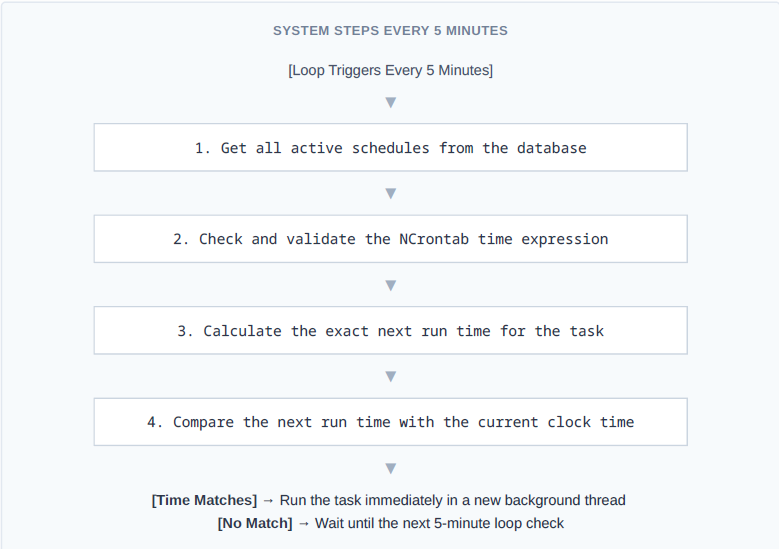
When a task is ready to run, the system opens a safe, separate memory thread to start the work pipeline. This keeps our system fast and efficient:
Running Multiple Tasks: The system manages many tasks smoothly. It completes the steps for Job 1, shifts quickly to start Job 2 and Job 3, and then releases system resources back to the computer while waiting for the next 5-minute check.
Maintenance and Support services ensure smooth application performance through regular updates, monitoring, troubleshooting, and technical assistance.
3. Solving Complex Scheduling Challenges
Challenge A: Running Tasks Every N Weeks
Standard cron syntax easily handles daily, weekly, or monthly setups. However, it cannot handle custom multi-week intervals, like running a task exactly “every 2 weeks” or “every 3 weeks” from a specific start date.
To solve this without using heavy or complicated external software frameworks, we added a simple math check on top of our NCrontab and Customization loop. When a weekly task triggers, the system runs a basic check:

By using this quick math modulo check on top of the standard cron trigger, the service easily runs complex multi-week schedules using very simple, low-overhead code.
Challenge B: On-Demand Manual Runs
Sometimes, operations teams need to run a data process immediately instead of waiting for the regular scheduled time. To handle these urgent manual requests without messing up the automated schedules, we split our tracking into two separate database tables:
|
Database Table Layer |
What It Tracks & How It Works |
| Automated Schedules Table | Saves regular, recurring task configurations, crontab styles, start dates, and status check flags. |
| Manual Overrides Table |
Tracks immediate, one-time task requests created by staff clicking a button on the dashboard. |
The background scheduling service checks both database tables at the same time during every 5-minute loop. If it finds a request in the manual overrides table, it instantly starts a new thread to process that job right away. This ensures urgent human requests are handled first while keeping independent, clean logs for full auditing.
DevOps Services and Solutions help businesses streamline development, automate workflows, and improve software delivery through efficient collaboration, monitoring, and continuous integration.
4. Conclusion
By combining a clean .NET 8 background worker and NCrontab and Customization with clear database tables, our scheduling system remains highly flexible. It easily supports advanced rules—like every-N-weeks math and instant manual overrides—while keeping our code simple and avoiding the heavy system costs of large third-party software frameworks.