

Securing Blazor Applications: A Practical Guide to Authentication in .NET 8/9
Executive Summary
Modern web development with Blazor requires a paradigm shift in how security is handled. Unlike traditional ASP.NET Core MVC, Securing Blazor Applications often span multiple execution contexts—Static SSR, Interactive Server, WebAssembly, and Interactive Auto—necessitating an authentication system that is reactive, state-driven, and capable of surviving across trust boundaries. This guide establishes a comprehensive architectural framework for securing Blazor applications, covering the authentication pipeline, state synchronization, declarative security, and recommended authentication strategies.
Why is Blazor Security Unique?
In most traditional web frameworks, code execution happens strictly on the server. Securing Blazor Applications is unique because it allows code to execute in two places at once—server and client—which is precisely why standard security approaches fail. This creates a “Trust Boundary” challenge: the server is inherently trustworthy, while the browser is untrusted. This boundary is further complicated by Blazor’s diverse render modes:
- Static SSR: Behaves like traditional MVC with full access to HttpContext and cookies.
- Interactive Server: Keeps the component tree alive via SignalR but lacks reliable HttpContext access post-connection, requiring the AuthenticationStateProvider.
- Interactive WebAssembly (WASM): Downloads the .NET runtime directly to the browser; relies on API tokens rather than direct database access.
- Interactive Auto: Starts as Static SSR and upgrades to WebAssembly, requiring careful state synchronization to prevent a “flicker” effect during handoff.
Because any code shipped to the client can be decompiled or modified, client-side role checks should be treated as user-experience enhancements rather than security
boundaries. Real authorization must be re-verified at the API and database layers for every transaction, regardless of the render mode employed.
“Getting this right requires more than following a checklist — it’s part of the broader discipline our team applies through security testing services, where we validate that authorization boundaries hold up under real-world attack scenarios, not just in code review.”
Understanding Balzor Core Security Components
To clear up common confusion, it is essential to distinguish between the three primary pillars of Blazor’s security architecture:
- ClaimsPrincipal (The Identity Container): This is the fundamental object that holds the identity of the user. It contains a collection of ClaimsIdentities, which in turn contain Claims (such as name, email, or roles). This is what the AuthenticationStateProvider ultimately produces and what the authorization system inspects to make security decisions.
- AuthenticationStateProvider (The Source of Truth): This is the underlying service responsible for calculating and verifying the userʼs identity. It logically determines who the user is by checking cookies, tokens, or persistent state.
- CascadingAuthenticationState (The Distributor): This is a UI component that takes the identity provided by the source and “cascades” it down the component tree, making it accessible to every child component via a cascading parameter.
- AuthorizeView (The Consumer): This component reads the cascaded state and conditionally renders UI content based on the user’s identity. It provides three specific templates:
- Authorized: Content displayed only to users who pass the authentication and authorization checks.
- NotAuthorized: Content displayed to anonymous users or those who fail specific role/policy requirements.
- Authorizing: Content displayed briefly while the system is still determining the user’s identity (crucial for smooth UX).
These components operate as a unified pipeline: ASP.NET Core middleware intercepts the request to generate a ClaimsPrincipal, which the AuthenticationStateProvider then resolves into a task-based AuthenticationState. CascadingAuthenticationState distributes this state through the UI tree to make it accessible to components. For Interactive Auto modes, PersistentComponentState bridges this identity to the client browser to avoid state loss during render mode switching. Finally, the UI reconciles this identity via the Routerʼs @attribute Authorize] directive and the AuthorizeView.
component, ensuring security is enforced from the server-side entry point down to the client-side UI.
Analogy: Think ofi the AuthenticationStateProvider as a central engine generating power, the CascadingAuthenticationState as the delivery pipe that carries that power to every outlet in the house, and the AuthorizeView as the appliance that decides when to turn on or ofifi based on that power flow.
Choosing Your Authentication Strategy: Cookies vs. JWT
Differences: Cookies are “browser-native,” automatically attached to requests and SignalR circuits, making them ideal for the Interactive Auto mode transition. JWTs are “application-native,” requiring manual logic for storage (e.g., localStorage) and explicit attachment to outgoing API headers.
Recommendation: Microsoft recommends Cookie-based authentication for its native security features, such as HttpOnly and SameSite attributes, which mitigate XSS risks and simplify state management across render modes.
EF Core Identity: As a transport-agnostic framework, EF Core Identity supports both strategies, often powering cookies for the web UI while simultaneously issuing JWTs for mobile or third-party API consumers.
Implementing Authentication by Mode
Standalone Server (Interactive Server)
In the Interactive Server render mode, authentication typically relies on standard ASP.NET Core cookie authentication. Because the application circuit resides on the server, you have direct access to HttpContext during the initial request. However, for subsequent interactions within the SignalR circuit, you must use the AuthenticationStateProvider rather than direct HttpContext access to ensure state consistency.
Standalone Server Implementation
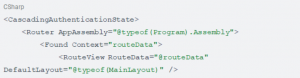
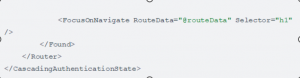
To ensure authentication state is available, wrap your root router in App.razor:
Standalone WebAssembly (Interactive WASM)
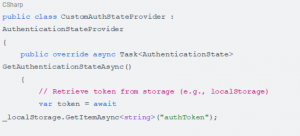
Authentication for Standalone WebAssembly requires a different approach since there is no direct server-side HttpContext access at runtime. Applications typically use OIDC or JSON Web Tokens (JWTs). The client-side AuthenticationStateProvider must be configured to manage these tokens—often by retrieving them from local storage or secure HTTP-only cookies—to maintain and verify the user’s state within the browser runtime.
Standalone WebAssembly Implementation
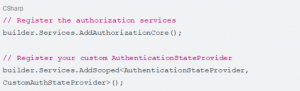
Register the necessary services in Program.cs:
Use a custom implementation to manage token state:
The Auto Render Mode Challenge
The Interactive Auto render mode combines both worlds, presenting a unique challenge for state synchronization. As the application starts in Static SSR (server-side context) and hands off to WebAssembly (client-side context), maintaining a unified identity is critical. To avoid the “flicker” effect during this transition, the authentication state, including the user’s identity claims, must be serialized on the server during the initial render and subsequently rehydrated on the client once the WebAssembly bundle loads and initializes.
Understanding PersistentComponentState
In Auto and WebAssembly render modes, PersistentComponentState acts as the critical bridge for state preservation. When your application renders initially on the server (Static SSR), it may perform operations like identifying the user.
PersistentComponentState allows you to “serialize” this state into the initial HTML response. When the WebAssembly runtime loads in the browser, it retrieves this serialized data instantly, avoiding the need to re-fetch information.
- Serialization (The Server’s Job): Allows components to save their current state—such as authentication tokens or user claims—into a JSON store that is embedded directly in the page.
- Deserialization (The Client’s Job): Allows the client-side component to read that same JSON store during initialization, effectively “hydrating” the component with the server’s pre-computed data.
Analogy: Ifi the AuthenticationStateProvider is the power engine, PersistentComponentState is the backup battery. It stores just enough power to ensure that when the main system switches firom being powered by the wall (the server) to being powered by the internal battery (the browser), there isn’t a
split-second loss ofi power (the “filicker”).
Implementing Authentication for Auto Render Mode
Because Auto mode starts on the server and switches to WebAssembly, you must bridge the gap between these environments. The most robust approach involves using PersistentComponentState to “handoff” the authentication state from the server to the browser, preventing the user from being logged out and back in during the render mode switch.
Implementation Pattern:
You should implement a single AuthenticationStateProvider that is “environment-aware.” It attempts to load state from the persistent store first (the data
passed from the server) and falls back to standard authentication if that isn’t available.
CSharp
public class PersistingAuthenticationStateProvider : AuthenticationStateProvider, IDisposable
{
private readonly PersistentComponentState _state; private readonly Task<AuthenticationState>
_authenticationStateTask;
private PersistingComponentStateSubscription _subscription;
public PersistingAuthenticationStateProvider(PersistentComponentState state, AuthenticationStateProvider provider)
{
_state = state;
_authenticationStateTask = provider.GetAuthenticationStateAsync();
// Subscribe to the persist event on the server
_subscription = _state.RegisterOnPersisting(OnPersisting, RenderMode.InteractiveWebAssembly);
}
public override Task<AuthenticationState> GetAuthenticationStateAsync() => _authenticationStateTask;
private async Task OnPersisting()
{
var authState = await _authenticationStateTask;
if (authState.User.Identity?.IsAuthenticated == true)
{
them up
// Serialize the user’s claims so the client can pick
_state.PersistAsJson(“user-claims”,
authState.User.Claims.Select(c => new { c.Type, c.Value }));
}
}
public void Dispose() => _subscription.Dispose();
}
By registering this provider, the server serializes the user claims into the HTML. When the WebAssembly bundle loads in the browser, it reads this JSON, rehydrates the ClaimsPrincipal, and ensures the user remains “logged in” seamlessly without the flicker effect.
Web Application Development helps businesses create secure, scalable, and user-friendly web solutions that improve digital experiences, productivity, and online growth.
Enforcing Authorization at the Route Level
For robust security, avoid manual authentication checks inside component lifecycles. Instead, rely on declarative authorization via the @attribute [Authorize]
directive. This is the architectural standard in Blazor because it instructs the Securing Blazor Applications Router to verify authorization before the component is even instantiated or rendered.
This approach offers two primary advantages:
- Router-Level Security: Because the router intercepts the request, unauthorized users never trigger the OnInitialized or OnParametersSet lifecycle methods, preventing sensitive logic from executing.
- Centralized Maintenance: It treats security as a metadata attribute rather than imperative logic, making it easier to audit and ensuring consistent
enforcement across your entire application.
Example:

Conclusion
Blazorʼs architectural flexibility requires a disciplined, security-first mindset. By centralizing security logic within the AuthenticationStateProvider, embracing declarative authorization via @attribute Authorize], and respecting the limitations of the client-side environment, developers can build resilient applications. Success in Securing Blazor Applications ultimately comes down to treating identity as a flow within a pipeline: ensuring seamless handoffs between server and client, prioritizing native
browser-managed cookies over JWTs for WebAssembly scenarios, and strictly enforcing authorization at the API and database layers. Mastering these patterns allows developers to navigate Blazorʼs unique security landscape with confidence and maintainability.